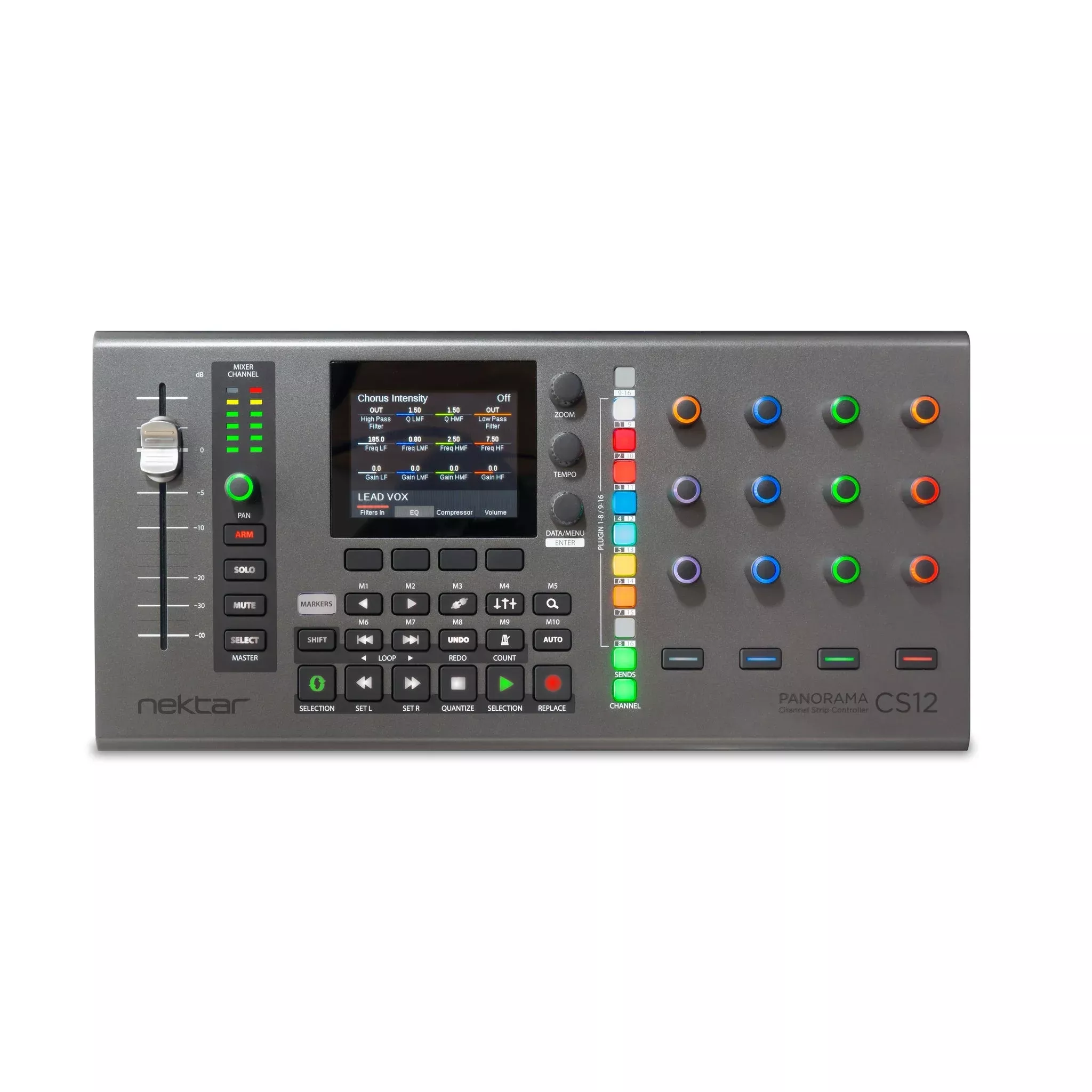
Nektar Panorama CS12 ChannelStrip Controller is a unique controller offering complete control over allLogic Pro channel strip parameters, including plugins, setting it apart fromother controllers. This innovative device is far from ordinary, as its entireworkflow is custom-designed to introduce remarkable features not seen before ona control surface.
High-Resolution Fader withTouch Sensing
The 100mm ALPS motorized faderseamlessly follows the selected mixer channel, providing detailed control withup to 14-bit resolution and touch sensing for real-time automation override andupdates.
Dedicated Controls
Alongside the fader, there arededicated pan controls, as well as buttons for solo, mute, and record arm,offering instant access to all primary mixer parameters on the selectedchannel.
Effortless Parameter Control
By simply clicking on a parameter,the 100mm ALPS fader instantly adjusts to the clicked position, allowing you totake control. The fader or pan rotary can manage any parameter in the currentlyselected Logic Pro channel at any given time.
Clean Automation
Panorama CS12 simplifiesautomation recording by enabling the insertion of automation points with ease,providing a clean and efficient process.
Complete Plugin Control
The device excels in controllingplugins, with pre-mapped commonly used plugins and the ability to control anyplugin without the need to view the plugin’s UI, ensuring a seamless editingexperience.
Plugin Slot Selection
CS12 uniquely controls insertplugins with 8 plugin slot select buttons, allowing immediate control over theselected plugin.
Plugin Parameter Learn
A quick learn feature facilitateson-the-fly assignments by simply moving a parameter and matching a control,with the added option to customize LED colors.
Nektarine Map Creation
For comprehensive control mapping,the Nektarine application/plugin lets users assign parameters to controlsthrough drag-and-drop, creating optimized page structures for the CS12,ensuring a tailored experience.
Key Features
- Motorized fader with a long throwof 100mm
- Control resolution of up to 14bits
- Ability to set volume and insertautomation point by touching the fader
- Dedicated pan control withilluminated channel color
- Features arm, mute, and solofunctions
- Option to use fader or pan controlto adjust any parameter in the current channel, including plugins
- Advanced control of AU and LogicPro insert effects
- Capability to control up to 12sends per channel
- Instrument control throughSelected parameter, SmartControl, or Logic Pro learn user pages
- 11 color illuminated buttons forselecting plugin slots, sends, and channel menus
- Fine control at a resolution up to10 times normal (14 bit)
- Zoom and tempo controls
- Access to 26 transport,navigation, and Logic Pro functions
Technical Specifications
System Requirements
USB class compliant, no driverneeded.
Nektar ControlCore installationrequired. Unit doesn’t operate on its own.
A Nektar account for registrationand download of support files.
USB Power Requirement: 500 mAminimum, connect to a USB high power port recommended.
MacOS: 11.5 or later.
Logic Pro: 10.7 or higher.
Dimensions & Weight
39 cm (L) x 11,5 cm (D) x 3,2 cm(H), 0,49 kgs
Included
Panorama CS12
Quickstart guide and functionaloverview. All other documentation is part of the download package.
USB A to C cable.